Table of Contents
HP 9000 Boot Device
Preface
The HP 9000 offers the option to boot from a device other than the default SCSI device in the boot administration menu. This is particularly useful if you want to boot a different operating system from an external drive or from a ZulusCSI with multiple disk images.
Change Boot SCSI ID
Interrupt the boot process with <ESC> to access the boot administration menu.
search SCSI Devices
BOOT_ADMIN> search scsi
shows a list of your scsi devices on the bus.
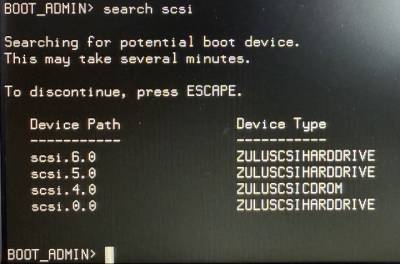
If you want to boot from the device with ID 5, simply enter:
BOOT_ADMIN> boot scsi.5.0
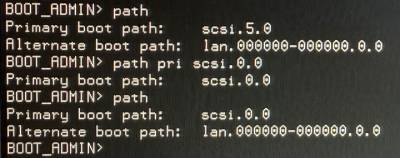
You can save the default boot SCSI ID with the following command.
BOOT_ADMIN> path pri scsi.5.0
And show the configured device path:
BOOT_ADMIN> path